Building an MDX portfolio with clear SEO and publishing rules
By Milad Akbari ·
This site is a single Next.js App Router application. Articles are MDX files in the same repository, and merging one into main is how it gets published. There is no CMS and no database. That keeps the moving parts few, but it also means the rules that a CMS would enforce have to live in code: a draft must never reach a production page, listing, feed or sitemap, every page needs correct metadata, and search engines should see nothing until the site is released.
This article describes those rules and where they live. The examples are excerpts from the site’s code, which uses Next.js 16 with @next/mdx and Zod 4.
Posts are files with validated metadata
Each article is content/blog/<slug>.mdx, and the file name becomes its URL. The file starts with its metadata as an ES module export:
export const metadata = {
  title: "Post title",
  summary: "One or two sentences for lists, search results and the feed.",
  publishedAt: "2026-11-10",
  draft: true,
};
When posts are loaded, a Zod schema checks that object:
const metadataSchema = z
  .strictObject({
    title: z.string().trim().min(1),
    summary: z.string().trim().min(1),
    publishedAt: z.iso.date(),
    updatedAt: z.iso.date().optional(),
    draft: z.boolean().default(false),
  })
  .refine((post) => !post.updatedAt || post.updatedAt >= post.publishedAt, {
    message: "updatedAt must not be before publishedAt",
    path: ["updatedAt"],
  });
strictObject rejects unknown keys, so a misspelled publishedat or an unsupported tags field fails instead of being silently ignored. z.iso.date() accepts only real calendar dates in YYYY-MM-DD form. A failure stops the build with the file name and Zod’s description of the problem, so a broken post never reaches a deployment.
One rule decides what is public
A post is public once it is not a draft and its date has arrived:
export function isPublished(
  post: Pick<PostMetadata, "draft" | "publishedAt">,
  today: string,
) {
  return !post.draft && post.publishedAt <= today;
}
today is the build date, which next.config.ts fixes when the build starts: BUILD_DATE: new Date().toISOString().slice(0, 10). Every page, the feed and the sitemap get their posts from the same function, so they cannot disagree:
export async function getPosts() {
  const posts = await loadPosts();
  return process.env.NODE_ENV === "development"
    ? posts
    : posts.filter((post) => post.published);
}
draft | publishedAt | next dev | Production build |
|---|---|---|---|
true | any date | Shown, marked Draft | 404, not listed |
false | after the build date | Shown, marked Scheduled | 404 until a build on or after it |
false | on or before build date | Shown | Published |
The listings, the article page’s “More writing” links, the RSS feed, the sitemap and the list of pages that analytics may report all call getPosts. A new place that shows posts should too.
Unpublished and missing posts return 404
Every post file is prerendered, published or not. For an unpublished one, getPost finds nothing and the page calls notFound(), so the build stores a 404 page for it:
export function generateStaticParams() {
  return getSlugs().map((slug) => ({ slug }));
}

export default async function PostPage({ params }: PageProps<"/blog/[slug]">) {
  const post = await getPost((await params).slug);
  if (!post) notFound();
  // …
}
generateMetadata calls notFound() as well. Otherwise the 404 response would keep the site’s default title, and a page with a static metadata export would even keep its own title and canonical URL.
A slug that matches no file is rendered on its first request. The root layout sets export const ensureStatic = "navigation", which requires every route to produce static output, and for a parameter that was not prerendered, Next.js “waits for the static result to be generated before serving it” (ensureStatic). The response therefore carries the 404 status from notFound() instead of a 200 with a fallback page.
The article page also declares export const instant = false, which allows navigations to it to block. The page needs its slug before it can render anything, and without the setting next dev reports that the route reads URL data outside a <Suspense> boundary. Production responses are the same either way. The browser tests request unpublished and unknown posts and check that both return 404.
Scheduled posts need a build
Pages are static, so nothing changes until the next build. A post dated next Tuesday is in the repository but not in today’s build, and it appears with the first production deployment on or after that date. The build date is in UTC, so a post dated 22 December goes live with a build that starts after midnight UTC, which is 1:00 in Munich in winter.
There are two practical ways to publish on a date:
- Redeploy the production deployment on that day, from the Vercel dashboard or with an empty commit to
main. - Let a schedule trigger a build. Vercel Deploy Hooks are URLs that “accept HTTP POST requests to trigger deployments and re-run the Build Step”, and a scheduled GitHub Actions workflow can call one every morning. GitHub notes that scheduled workflows run in UTC, “can be delayed during periods of high loads”, and are disabled in public repositories after 60 days without activity (Events that trigger workflows). Anyone with the hook’s URL can deploy, so it belongs in a repository secret.
Either way, the date in the file says when a post may appear, not when it will.
Metadata for every page
The root layout sets what every page shares: metadataBase for absolute URLs, a title template that produces titles such as “Work | Milad Akbari”, the default description, Open Graph defaults, and noindex until the release. Each page adds its own title, description and canonical URL:
export const metadata: Metadata = {
  title: "Writing",
  description:
    "Articles by Milad Akbari on backend engineering, web applications and applied AI.",
  alternates: {
    canonical: "/blog",
    types: { "application/rss+xml": "/rss.xml" },
  },
};
Pages deliberately do not set openGraph. Next.js merges metadata from the layout and the page shallowly, and “nested fields such as openGraph … defined in an earlier segment are overwritten by the last segment to define them” (generateMetadata). A page that set only an Open Graph title would lose the shared settings and the share image generated by opengraph-image.tsx.
Structured data describes the person on the home page and each article as a BlogPosting. Next.js recommends rendering JSON-LD as a <script> tag and notes that JSON.stringify “does not sanitize malicious strings used in XSS injection”, suggesting to replace < with \u003c (JSON-LD guide). The site does that in one small component:
export function JsonLd({ data }: { data: Record<string, unknown> }) {
  return (
    <script
      type="application/ld+json"
      dangerouslySetInnerHTML={{
        __html: JSON.stringify(data).replace(/</g, "\\u003c"),
      }}
    />
  );
}
The sitemap and the RSS feed are built from getPosts like everything else, and robots.txt allows crawling and points to the sitemap.
Noindex is not access control
Until the release, every page carries <meta name="robots" content="noindex, follow"> and an X-Robots-Tag: noindex header. Crawling stays allowed on purpose: Google’s documentation says that “for the noindex rule to be effective, the page or resource must not be blocked by a robots.txt file”, because otherwise “the crawler will never see the noindex rule” (Block Search indexing with noindex).
noindex is a search instruction, not access control. Anyone with a public address can still read it. Draft posts therefore return 404 in production and stay out of listings, feeds and client bundles; protected previews add an access check. After release, noncanonical hosts retain an HTTP noindex header even when the canonical production site is indexable.
Images, code and tables
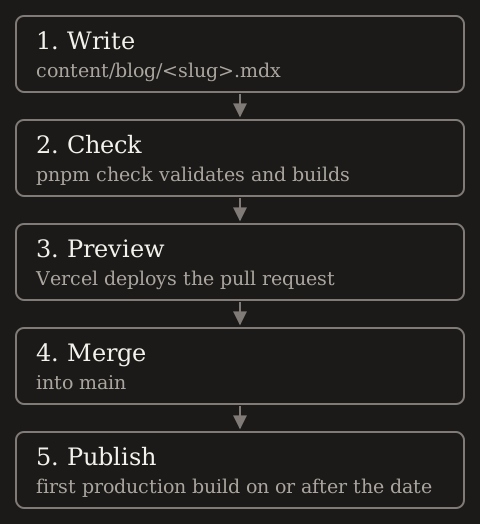
An article imports its images, so their width and height are known at build time and the page does not shift while they load. The diagram above is a file next to this article:
import publicationFlow from "./building-an-mdx-portfolio/publication-flow.svg";

<Image src={publicationFlow} alt="Publishing flow in five steps: …" />
Image is not imported in the article. mdx-components.tsx maps it to next/image with a sizes value that matches the 650 px column, and wraps two elements that can be wider than the column:
const components: MDXComponents = {
  // Code samples that scroll sideways can be scrolled with the keyboard.
  pre: (props) => <pre tabIndex={0} {...props} />,
  // Wide tables scroll on their own instead of widening the page.
  table: (props) => (
    <div tabIndex={0} className="overflow-x-auto">
      <table {...props} />
    </div>
  ),
  // Posts import their images, so width and height are known: <Image src={…} alt="…" />
  Image: ({ alt, ...props }: ImageProps) => (
    <Image alt={alt} sizes="(max-width: 650px) 100vw, 586px" {...props} />
  ),
};
Code is highlighted during the build by @shikijs/rehype, so highlighting adds no JavaScript to the page. rehype-slug gives every heading an id derived from its text, which keeps links to sections stable as long as the heading does not change.
Tradeoffs
- Publishing requires Git and a deployment. That suits one author who writes code anyway; a team of editors would want a CMS.
- Validation happens at build time. A mistake fails the build instead of reaching readers, but nobody sees the error until the build runs, so
pnpm checkbelongs in the workflow before every merge. - Scheduled posts need something to trigger a build. Without it, a post appears whenever the next unrelated deployment happens.
- Static pages leave no room for per-request behavior, which this site does not need.
The rules are short enough to read in a few minutes, and that is the point. One function decides what is public, one schema decides what a post may contain, and the tests check both against the production build.